Portain ⛵
See what's running. Act on it fast.

Portain is a native macOS app for seeing what's running — your Docker containers and the processes holding your ports — and acting on them fast. Think PortKiller × OrbStack, minus the orchestration: pure visualization plus simple, safe actions. It's built entirely in Swift and SwiftUI, and it's read-only by design — it shells out to docker and lsof and never installs or changes anything you didn't click.
Containers
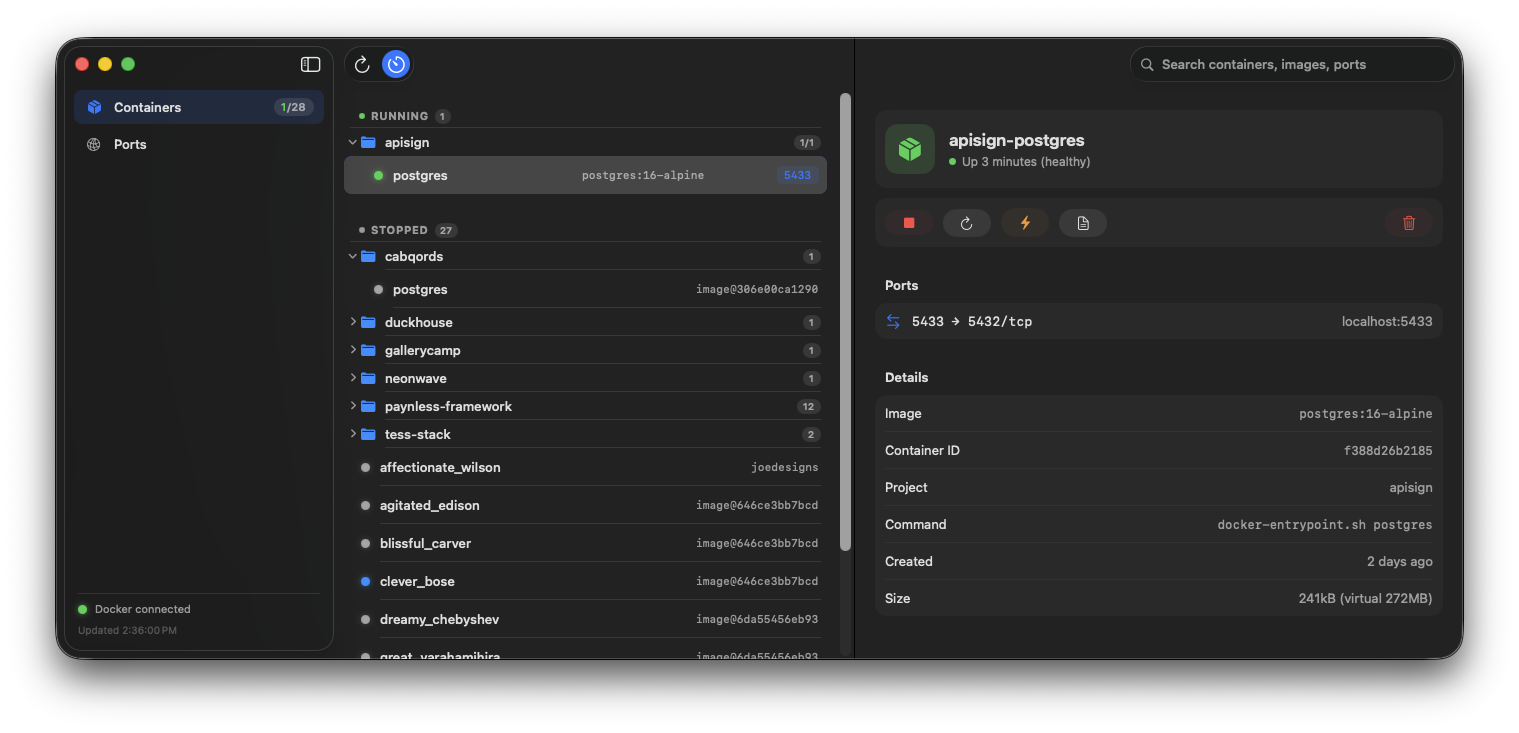
Every container, grouped into Running and Stopped sections and nested under collapsible, Finder-style Compose project folders. Running folders expand by default, stopped ones stay tucked away. Each row is a single line — status dot, name, image, published ports — and hovering reveals inline start/stop actions so you never have to dig.
Click into one and the native detail pane gives you the full set of controls — Start · Stop · Restart · Kill · Logs · Remove — alongside a ports table, live CPU and memory readouts, and a logs viewer. Everything you'd normally string together from a handful of docker commands, in one place.
Ports
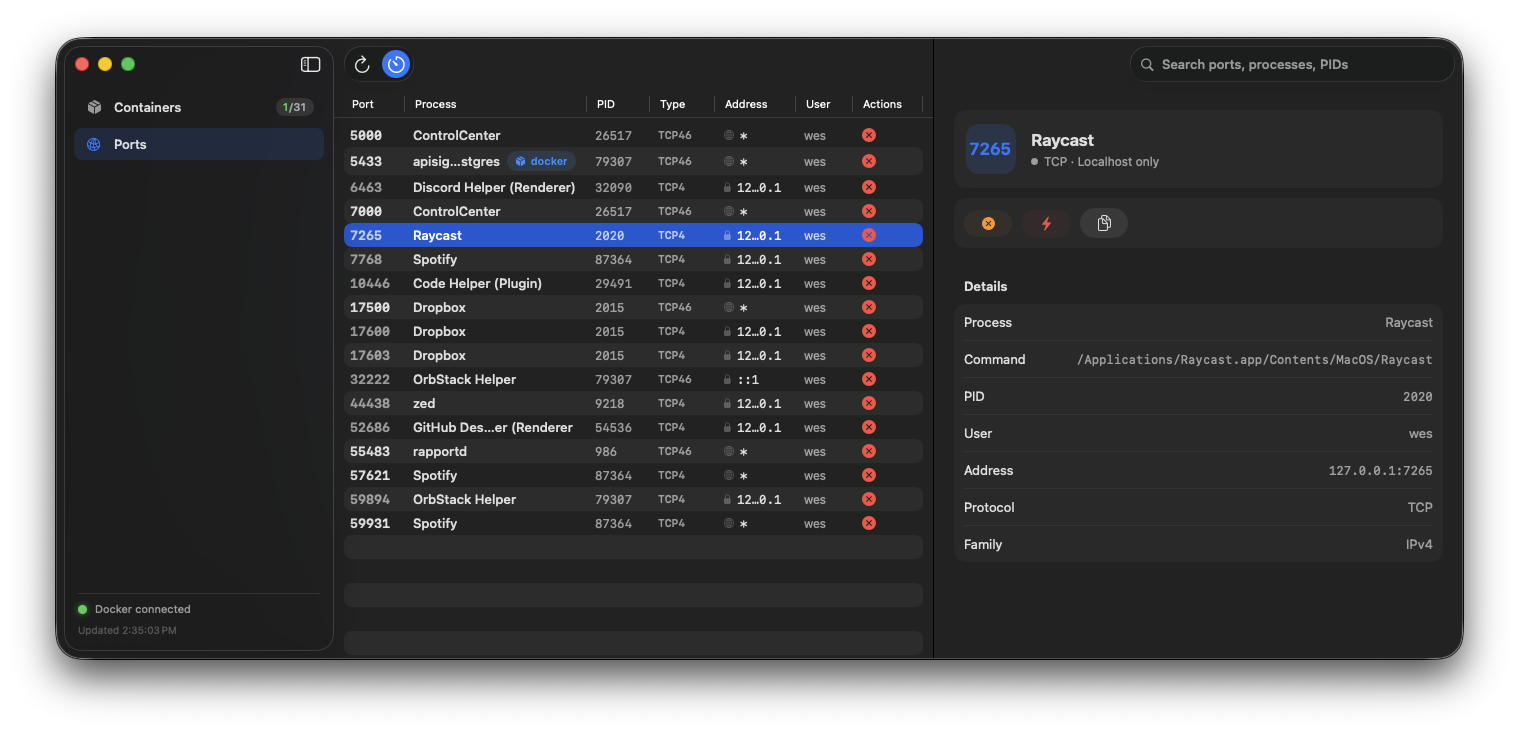
The Ports view is a native table of every listening TCP port: process, PID, type, address, and user. Found something squatting on 3000? Terminate it with SIGTERM or Force Kill with SIGKILL — one at a time or many at once. Each port cross-links back to the Docker container that published it, so you always know what you're about to touch. And because the Ports view leans on lsof, it works whether or not Docker is even running.
Read-only by design
The thing I care most about with a tool like this is trust. Portain never installs a daemon, never runs a background agent, and never mutates state you didn't explicitly ask it to. Under the hood it's just well-known commands:
| Concern | Source |
|---|---|
| Containers | docker ps -a --format '{{json .}}' + docker stats |
| Actions | docker start / stop / restart / kill / rm |
| Ports | lsof -nP -iTCP -sTCP:LISTEN -F |
| Kill port | kill -TERM / -KILL |
If you try to kill a process owned by another user or the system, it reports a clear error instead of failing silently. No surprises.
Native, not Electron
Portain is SwiftUI top to bottom — native sidebar, system materials, and SF Symbols, no web view in sight. It auto-refreshes every three seconds (toggleable), ⌘R refreshes on demand, and live search filters containers and ports as you type. It's a universal binary, so it runs natively on both Apple Silicon and Intel.
Installing it
The easiest way is the prebuilt download:
- Grab the latest
Portain-x.y.z.dmgfrom the Releases page. - Open the
.dmgand drag Portain into Applications. - First launch only. Portain is open source and not notarized by Apple, so macOS blocks it the first time with "Apple could not verify…". Either open System Settings → Privacy & Security, scroll to the Portain message, and click Open Anyway, or run this once in Terminal:
xattr -dr com.apple.quarantine /Applications/Portain.appPrefer to build it yourself? Clone the repo and you're one command away:
swift run                 # dev build, runs immediately
bash scripts/bundle.sh    # → Portain.app (ad-hoc signed, with icon)
It needs macOS 14+ and the Swift toolchain. The app ships as a universal binary, so it runs natively on Apple Silicon and Intel. Docker is optional — the Ports view works without it.
Using it
Launch Portain and it opens straight into the Containers view. The sidebar toggles between Containers and Ports:
- Manage a container — click any row to open the detail pane, then Start · Stop · Restart · Kill · Logs · Remove. Hover a row in the list for inline start/stop without leaving the overview.
- Free up a port — switch to Ports, find the process squatting on the port you need, and hit Terminate (SIGTERM) or Force Kill (SIGKILL). Select several at once to clear them in one go.
- Find anything fast — the search box filters containers and ports live as you type.
- Stay current — the view auto-refreshes every 3 seconds (toggle it off if you'd rather it hold still), or press
⌘Rto refresh on demand.
That's the whole app. No setup, no config files, no daemon — just open it and act on what you see.
Built with Claude
Portain was built entirely with Claude — the SwiftUI views, the docker and lsof plumbing, the Compose-project grouping, the release scripts. Describe the behavior, iterate, ship. It's another example of how much ground you can cover when you pair AI with a clear picture of the tool you actually want.
There is a full tour of the app at /portain, with a live, clickable version of the window. It's open source under the MIT license and needs macOS 14+. Grab a build from the Releases page, or build it from source with swift run. Docker is optional — the Ports view works without it.